Software
·
2026

toqe.
Local-first project manager and cash-flow forecasting for independent work.
Visit the site

Better than the sum of its parts
toqe is my latest (and current favorite) app to run my bookings and manage my finances. After multiple years of handling manual pages and circumventing limitations from Notion, I saw an opportunity to dig in and make the tool I always actually wanted.
For a long while, Notion was genuinely the right tool — but the more I tried to make it better, the more often I hit a limit I couldn’t build around. A great deal of automations I wanted weren’t possible. I was tracking my expenses there, but bringing in connections back and forth from projects, doing the math, and keeping things in order was becoming a convoluted mess. A project tracker and an expense ledger don’t need a wiki bolted to the side of them. Plus, with the recent push to AI, Notion has become more and more bloated with features that are less about controlling my data and more about putting it in the hands of some agent or AI companion or whatever the hell they love to call them nowadays. I wanted the small, sharp version, so I built it.

Software you can actually own
Part of the incentive for me to make this app was to stop depending so much on monthly subscriptions, that essentially mean “pay forever, or eventually figure out how where to put your data”. Therefore, being local-first was the first decision. No Online-Only crap, no “pay us monthly”, and no “give your data to some random company”. Everything else followed from it. Your data sits on your machine, the app opens instantly, and nothing about it expires after you decide you don’t want to pay. I will get into more detail later, but when I eventually decided to open this tool up for other people, this is still the model I decided to carry forward: you pay once, you have the app, with all of it’s features. Forever.
I’m on my “learning about marketing” phase, and everything seems to indicate that subscription-based pricing creates the most revenue, for better or worse. However, there is something so satisfying about those days [before everything became shit] where you could pay for software an own it, that it just feels like the right thing. In this era of vibe-coding where anyone can kickstart their own project, I surely hope this can be the trend, but we’ll have to see. Anyhow, let’s dive into the toqe features and solutions:
Projects and finances are two sides of the same coin
When it comes to the basics: most expense trackers are either too simple to be useful or built for entire finance departments. toqe aims at the middle: creators, freelancers and small studios. When I did my research, the answer is usually one app for the work and another for the money, which never made sense to me: they’re the same information seen from two angles. There are also apps like Xero or, god forbid, Quickbooks, which let you create invoices and track your expenses, but are a little bit of a catch-all, look like they’re made for your accountant, and include way too many features that are a bit of a nightmare to navigate through, if you even need them.
And don’t get me wrong, toqe is not *quite yet* trying to replace those or become your accountant’s tool, but it’s bringing such a set of features and tools that it totally could.
Because toqe already knows what you have booked and what it pays, it can hold that against what you spend and tell you something neither tool could on its own.

The App
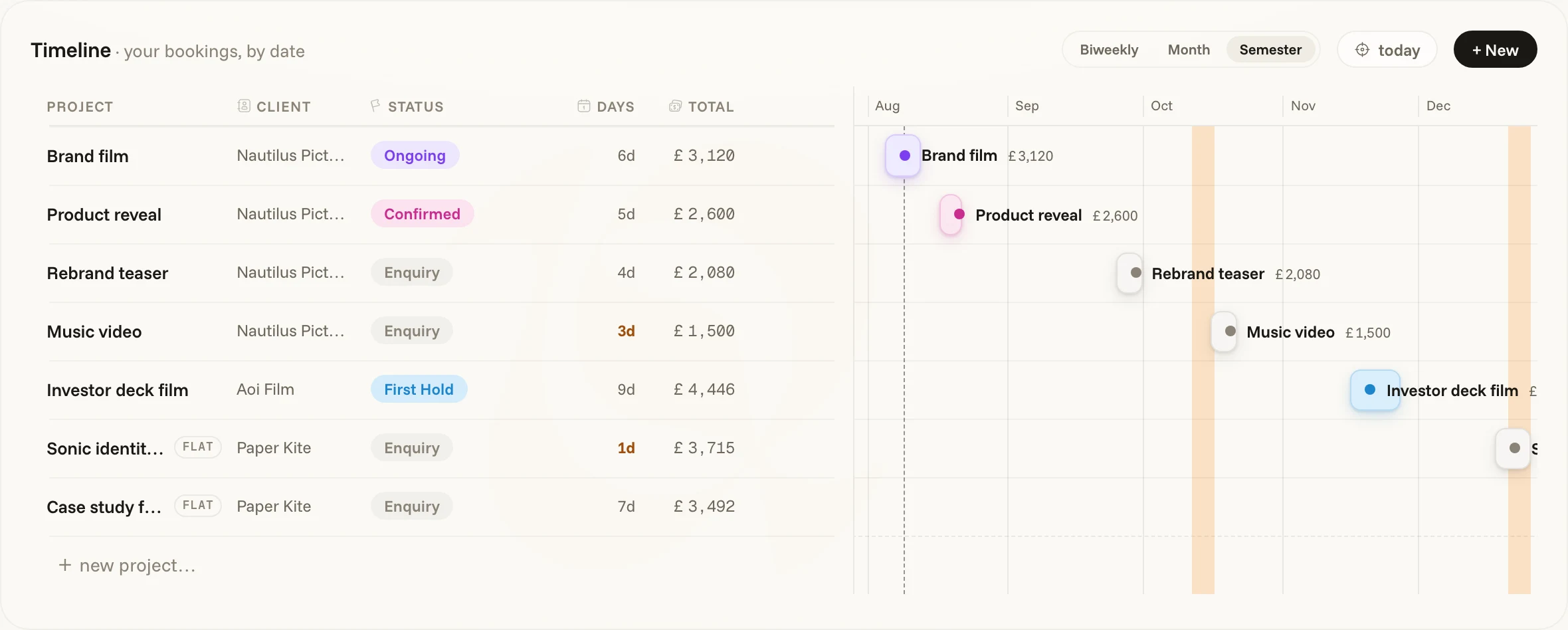
The app consists of three sections: Overview, Work, and Money. Each of these sections has specific tabs dedicated to their title, but they all “speak” to each other, and this is what makes toqe powerful: Your holds, enquiries and bookings know about your expenses, studios, and upcoming taxes, and vice-versa! toqe is able to accurately predict your cashflow, if you need to find some extra work, or if you’re good to chill for that last week of the month. Hold and enquiries for specific studios are kept on track and inform you about your past projects with each studio, your rates, or how many times you’ve successfully worked with them before (or not-so-successfully).

Because it tracks your projects and your invoices, it can automatically keep tabs on when you’re meant to be paid, if there is anything overdue, or if you need to chase a specific studio. Similarly, if everything is going on track, toqe will let you know and give you some heads-up only if you need it.
The Pipeline
At its core, toqe works with a system that I already had on my Notion and that I called “the pipeline”. It’s simple: projects start as an enquiry (when you’re reached out by a client) and through a “status” tag they advance through other statuses (the pipeline) until they arrived at “paid” which in this case is the final status. Projects can also be a Hold (when you’ve been asked about specific dates), Ongoing while you’re working on it, Complete when you’ve just finished the project, or Invoiced when you’ve sent the invoice after completing the project.
Where it started, and where it is
toqe started as a personal tool for me, but much like my previous Notion template, the more I shared it with people the more they asked to try it or let me know how much it would help them, so I decided to turn it into something available globally, and I am slowly adding compatibility with things like e-invoicing, multiple countries and their specific tax laws, math and brackets, and I’m even translating it to Spanish because I thought it would be fun.
Unlike some other apps before it, I have put a price on toqe because turning it into an app that can cater to many, many people has come with a lot of work and effort, to the point where I’ve been doing it on my free time after work almost as if it were a second job. The good news and the primary reason for it’s buy-once-have-it-forever pricing model is that once toqe works, it works. I don’t need to run any servers as your data lives locally with you, so my ongoing costs can be zero. But while I am developing, adding features, removing bugs, and doing never-ending refinements to the UI, this price shall act as a way to recoup some of the costs. toqe is available now for download here.